










Breaking News
 Who Will Find What the Finders Hide? Addendum
 Seven Days in the Dark: How I Watched My Neighbors Turn Into Thieves...
 Oracle Invokes Force Majeure on Project Jupiter AI Data Center
 Something to Know About Saaaaaaafety
Top Tech News
 Tesla Model 3 killer charges from 10 to 97% in just 9 minutes
 World-first unpowered DNA computer sets speed record
 I Power 5 Buildings Off-Grid. Here's How
 The US government is pushing hard to get a working nuclear fission reactor into space by late 2028
 SpaceX Starmind AI in Space Radiator
 China Will Dominate Global Nuclear Energy Through 2035, Analyst Says
 These Absolutely Wild-Looking EVs Are Saudi Arabia's First Homegrown Cars
 BEYOND THE MOON: NASA plans a nuclear-powered fleet to push DEEPER into space
 Big Oil Backs Mazama's $135 Million Bet On Superhot Geothermal
 Quantum compass takes flight on Northrop's Lumberjack drone


D-Link Introduces the 5G NR Router and Exo Mesh Wi-Fi Routers
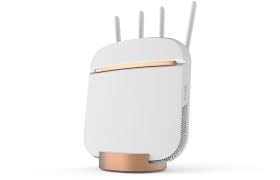
At CES 2019, D-Link presented a new series of Exo mesh-enabled smart Wi-Fi routers that come preinstalled with a McAfee security suite. D-Link also introduced its first 5G router.
A mesh Wi-Fi router spreads the network across one or more access points to cover a wider area. This is helpful for users who either have a large property or struggle with Wi-Fi-blocking obstacles, such as concrete walls or ceilings. In contrast to non-mesh Wi-Fi extenders, which create multiple separate networks, a mesh Wi-Fi network is a unified network, meaning you can seamlessly move between different access points.
The five Exo routers in the new series support 10 or more access points. The number isn't limited, but D-Link told us that it hadn't tested more. At D-Link's test house, this setup covered around five thousand square feet, but your results will vary depending on your environment.
The lower-end Exo AC1300 is a dual-band router, while the high-end AC3200 features tri-band Wi-Fi.
For ease of use, the Exo routers use a WPS switch for Wi-Fi Protected Setup. The problem with this convenient solution is that anyone with access to the button could gain access to your network. So make sure to secure your router to prevent unsolicited access.