










Breaking News
 Exposing the enablers
 Great Coin Show, You Won't Believe What I Found!
 "AI-ENGINEERED" THE NEXT THREAT TO AMERICAN AGRICULTURE
 China Found Something Better Than Oil
Top Tech News
 BEYOND THE MOON: NASA plans a nuclear-powered fleet to push DEEPER into space
 Big Oil Backs Mazama's $135 Million Bet On Superhot Geothermal
 Quantum compass takes flight on Northrop's Lumberjack drone
 Terrifying AI Behavior Even Its Creators Couldn't Explain
 WW3 Near-Miss? AI Hallucinated Nuclear Weapons Components Aboard Chinese Vessel Bound For Iran
 Stripe Is Building the Toll Road for the Machine Economy
 Toyota Dakar hopeful swaps twin-turbo V6 for hydrogen fuel cells
 4-min turbo-inflatable cubic camp castle is now available in the USA
 Researchers Used Claude To Hack OpenAI Employee Accounts
 Chinese Scientists Develop New Oil Refining Method That Cuts Energy Use by 90%



Insta360's Go 2 actioncam is still tiny, but more capable
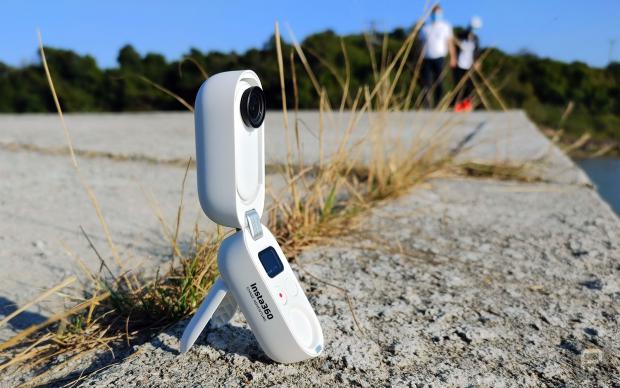
Like the original Go, the Go 2 features Insta360's FlowState digital image stabilization technology for smoothing out shaky shots. It can also likewise be clipped onto your clothing using a two-part magnetic mount, although other mounting options are available.
Footage is captured via a 120-degree fish-eye lens, along with a 1/2.3-inch image sensor which is larger than that of the Go. Video is recorded at a default resolution of 1440p/30fps, up slightly from the Go's 1080p.
It should be noted that the camera offers only about 28GB of usable storage, so it can't record real-time clips longer than 30 minutes in non-stabilized mode – that figure drops to 10 minutes with FlowState stabilization, or 15 minutes with basic stabilization. Still, it's much better than the Go, which can only manage real-time clips no longer than five minutes.
One charge of the Go 2's 210-mAh battery should reportedly be good for a runtime of 30 minutes, if the camera is just used on its own. It can, however, be placed within an included 1100-mAh battery-equipped charging case, which should keep it going for 150 minutes. That case can also be used as a mini tripod-like stand for the camera, or as a wireless Bluetooth remote control to start and stop recording.
As is the case with many other diminutive video cameras, users line up shots and review footage via an iOS/Android app on their paired smartphone. That app also allows them to change settings and access features such as time-lapse and 1080p/120fps slow motion.