










Breaking News
 15 Years After Occupy, the Case Against the System Has Never Been Clearer
 8 Prepper Hacks for Cleaning Without Running Water
 The Economy Is Stagnating
 Britain To Appoint A Dedicated Tax Agent To Every Single Billionaire
Top Tech News
 BEYOND THE MOON: NASA plans a nuclear-powered fleet to push DEEPER into space
 Big Oil Backs Mazama's $135 Million Bet On Superhot Geothermal
 Quantum compass takes flight on Northrop's Lumberjack drone
 Terrifying AI Behavior Even Its Creators Couldn't Explain
 WW3 Near-Miss? AI Hallucinated Nuclear Weapons Components Aboard Chinese Vessel Bound For Iran
 Stripe Is Building the Toll Road for the Machine Economy
 Toyota Dakar hopeful swaps twin-turbo V6 for hydrogen fuel cells
 4-min turbo-inflatable cubic camp castle is now available in the USA
 Researchers Used Claude To Hack OpenAI Employee Accounts
 Chinese Scientists Develop New Oil Refining Method That Cuts Energy Use by 90%



How to Get Wi-Fi Without an Internet Service Provider: 5 Methods

1. Mobile Hotspot
The best way to make sure you have the internet on your laptop at all times is to use a mobile hotspot.
Of course, there is an upfront cost of doing so—you will need to buy a hotspot device and subscribe to a mobile internet plan. Quite a few companies offer mobile hotspots.
There are three mobile hotspot models we particularly recommend:
Despite being a couple of years old, the Verizon Jetpack MiFi 8800L is probably still the best 4G hotspot available right now. It uses Qualcomm's X20 modem and supports 11 LTE bands. It provides both 2.4 and 5GHz mobile networks, supports guest connections, and allows you to connect up to 15 devices to the network at once.
Advertisement
The device is only available through Verizon. You can get the device for $99 if you sign up for a two-year mobile internet contract. It is $199 if you buy the device contract-free.
The HTC 5G Hub is the best 5G mobile hotspot on the market.
The device has a Qualcomm Snapdragon 855 CPU, a Snapdragon X50 5G modem, 4GB of RAM, support for Bluetooth and Ethernet connections, all-day battery life, and the ability to connect up to 20 devices at the same time. It runs Android.
On the downside, 5G is still not available everywhere. If you're looking for a hotspot that will work when you're off the beaten path, the HTC 5G Hub might not be for you.
Sprint MiFi 8000 Mobile Hotspot
The MiFi 8000 (only available on Sprint in the US), can provide internet speeds of up to 1Gbps while you're on-the-go.
The device will run for 24 hours on a single charge, supports guest connections, and offers an onboard VPN for added security.
Under the hood, you'll find 4GB of RAM and the in-house MiFi OS2 operating system.
Roaming Man U2 Global 4G Wi-Fi Hotspot
If you need a laptop internet while you're traveling outside of the United States, you need a mobile hotspot and internet plan that both work internationally.
We like the Roaming Man U2 Global 4G Wi-Fi Hotspot. It works in more than 130 countries with prices of $8 to $10 per day.
Of course, at those prices, it is not a suitable domestic option. But if you're on vacation and need to stay connected to home, it remains cheaper than using roaming internet on your smartphone.
2. Tether Your Smartphone or Tablet
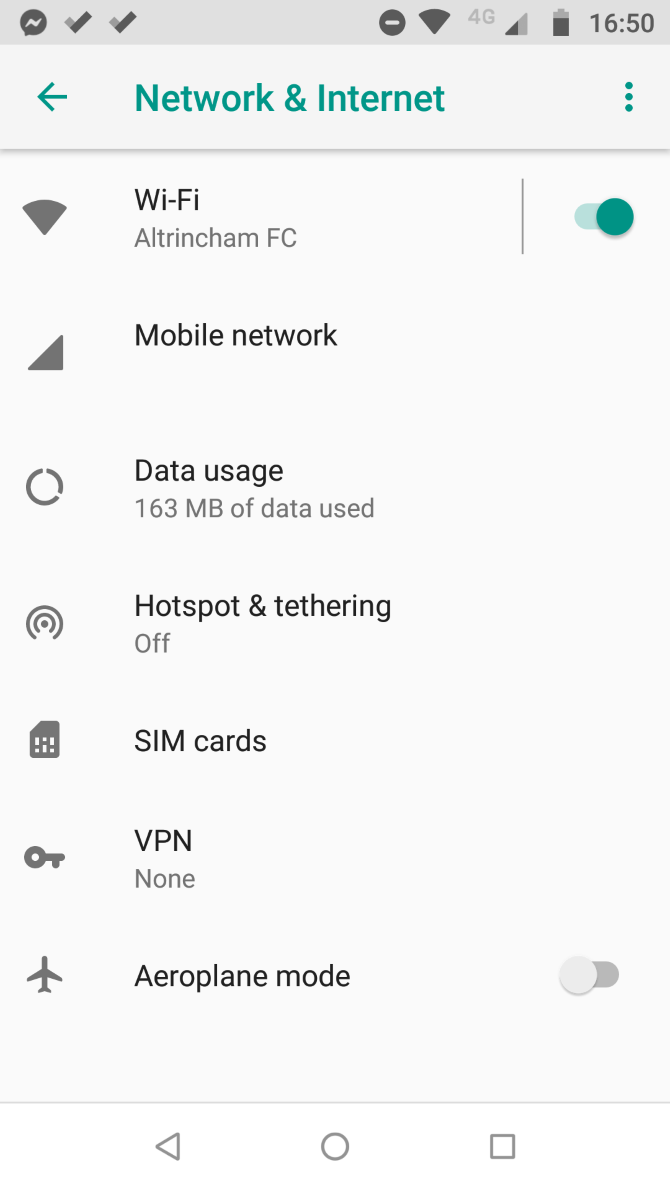
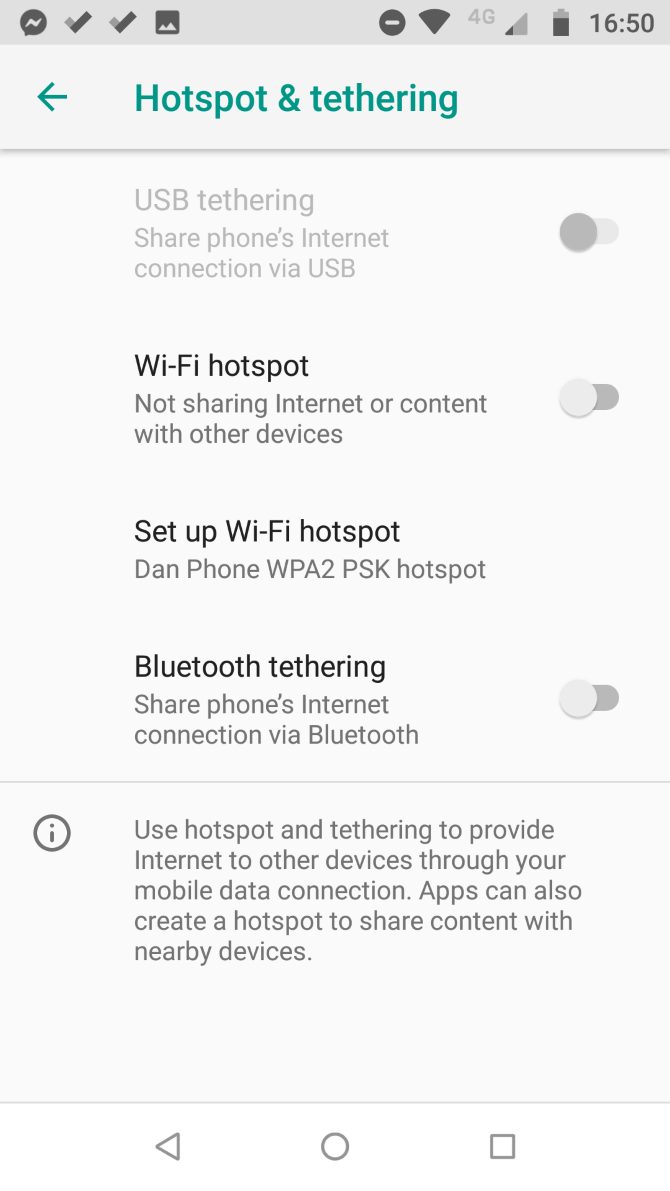
If you don't need regular mobile data and instead just need occasional access to the internet on your laptop, the fastest and easiest way to get online is often to tether your smartphone.
Tethering your smartphone or tablet does have two drawbacks.
You're entirely dependent on the signal of your mobile phone carrier. That's fine if you're in a city, but less reliable if you're out in the country.
Laptops typically use much more data than smartphones, meaning you could be in for a nasty surprise when your next phone bill lands in your mailbox.
If you have an Android device, you can enable tethering by heading to Settings > Network and internet > Hotspot and Tethering, then slide the toggle next to Wi-Fi Hotspot into the On position. iOS users need to go to Settings > Personal Hotspot and slide the toggle.
On both Android and iOS, you should set a new username and password to protect the security of your hotspot.