








Breaking News
 This is the future we shall bring into being
 Elon Musk's Vision For The Future Looks Like A Movie
 Phosphorus Munitions Fired by Israel Burn Groves, Orchards in Southern Lebanon
 Iran's IRGC Warns It Will Expand 'Geography of the War' If the US Attacks Again
Top Tech News
 BEYOND THE MOON: NASA plans a nuclear-powered fleet to push DEEPER into space
 Big Oil Backs Mazama's $135 Million Bet On Superhot Geothermal
 Quantum compass takes flight on Northrop's Lumberjack drone
 Terrifying AI Behavior Even Its Creators Couldn't Explain
 WW3 Near-Miss? AI Hallucinated Nuclear Weapons Components Aboard Chinese Vessel Bound For Iran
 Stripe Is Building the Toll Road for the Machine Economy
 Toyota Dakar hopeful swaps twin-turbo V6 for hydrogen fuel cells
 4-min turbo-inflatable cubic camp castle is now available in the USA
 Researchers Used Claude To Hack OpenAI Employee Accounts
 Chinese Scientists Develop New Oil Refining Method That Cuts Energy Use by 90%



Protected Text - The safest site on the web for storing your text!
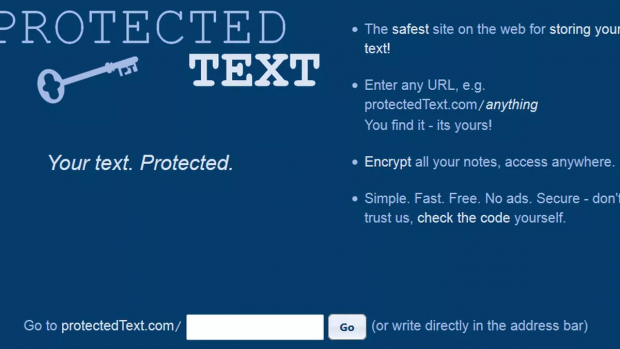
Protected Text - https://www.protectedtext.com/
-The safest site on the web for storing your text!
-Enter any URL, e.g. protectedText.com/anything
You find it - it's yours!
-Encrypt all your notes, access anywhere.
-Simple. Fast. Free. No ads. Secure - don't trust us, check the code yourself.
ProtectedText is an free online notepad with password, where you can securely save your notes on the web.
It's a secure notepad with password, for all your notes, ideas, to-do lists, scripts, etc. You can store notes online at ProtectedText.com/ANY_SITE_YOU_TYPE and access from any web browser. It's free and also without ads and tracking, and you don't even have to register or have any kind of account. Store your notes anonymously and encrypted in this simple and secure free online notepad. You can also use our Android app to access your notes conveniently from your Android device.
Why is it safe?
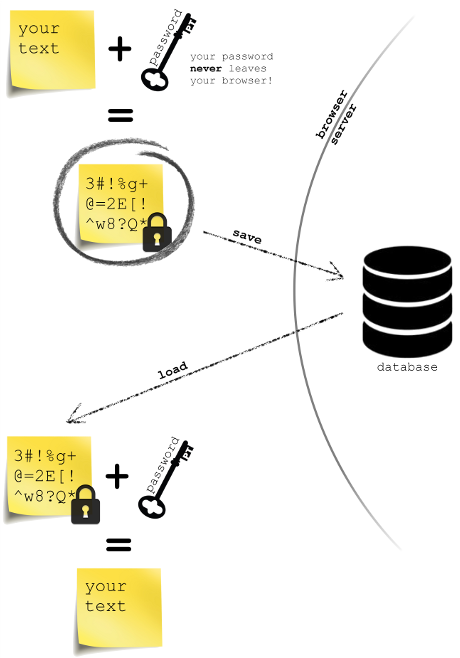
-Your password isn't sent to our server - we can't decrypt your text even if we wanted to. Only encrypted text is sent over the Internet.
-No cookies, no sessions, no registration, no users tracking. We can't identify you at all. We can't know when the same user visits two different sites.
-No logging in or out, just close the browser tab and you're safe.
-No ads - we hate ads because they can track you, and they're distracting.
-You don't have to trust anyone or agree on anything - check the code yourself. All our code is well written and full of comments so that you can understand it in details - start by looking at main.js, and check communication with our servers.
-If someone wants your text, he'll need your password, but he'll have to find your site first.
Overwrite protection
-You can use the same sub-site from multiple browsers/devices at the same time, without having to worry about ever losing any changes.
FAQ:
1. Q: I've forgotten my password, what can I do?
A: Passwords are never sent to our servers. We only store encrypted text - which is useless data once a password is lost. Also, we don't know who this text belongs to.
2. Q: Please explain 'Trustless Security'.
A: Your password never leaves your device. We only store encrypted content. You don't have to trust us, or anyone else with your password, since only you know it and only you can decrypt your notes. It's like if you're writing a diary with special characters that only you understand. It doesn't matter where you keep this diary, since only you can understand the text that's inside.
3. Q: How can I make encrypted backup of my notes?
A: It's simple: Open your site with Google Chrome or Mozilla Firefox and save the site before decrypting it (Ctrl + S should work). Make sure to save the site while 'Password required' dialog is still visible. To open your encrypted backup, open saved .html file and type in your password.
4. Q: Why is my URL changed from "Mark's notes" to "mark-s-notes"?
A: Some characters aren't allowed in URL addresses, that's why your URL is redirected to a URL that has some characters replaced with dashes. You can always type in "Mark's notes" and you'll be redirected to the same URL.
5. Q: Can I make a site public?
A: You can add the password after the URL of your site, like this: ProtectedText.com/yourSite?yourPassword which will automatically decrypt yourSite with yourPassword.